
TL;DR
Outdoor smart lighting combines connected fixtures, bulbs, switches, sensors, and controllers so you can manage exterior lights remotely or set them to run on schedules and motion. Choose equipment suited to its exposure, check how it connects and behaves when the internet is down, and aim only as much light as you need. A porch, path, and side gate often work best as separate zones with different brightness and schedules.
The best outdoor light may be the one that turns itself off before your neighbor notices it. A porch lamp that glows at sunset, a path light that comes on for a late arrival, and a side-gate light that stays dark the rest of the night can make a home easier to use without turning the yard into a stadium.

Get garden gear delivered free with Prime
- Fast, free delivery on millions of items
- Prime Video, Amazon Music and more included
- Member-only deals all year
Outdoor smart lighting connects bulbs, fixtures, switches, sensors, or controllers so you can manage exterior lights from an app or let routines handle them. The setup can cover an entryway, garden, patio, garage, or path. What you choose affects more than convenience: connection range, weather exposure, brightness, installation, privacy, and what happens during an internet outage all shape whether the system feels dependable.
This guide walks through those choices with practical examples. You’ll learn how to plan useful zones, compare power and connection options, set schedules and sensors, and keep light aimed where you need it. The goal is simple: a welcoming home at the door, clear footing on the path, and a darker sky beyond your property.
Plan separate zones for the porch, path, patio, and side gate so each area gets light suited to its use.
Compare lumens for output and color temperature for appearance; aim fixtures down to limit glare and spill.
Check the device’s connection protocol, hub needs, platform compatibility, and offline behavior before buying.
Choose hardwired, plug-in, low-voltage, or solar power based on the location, exposure, and available sunlight.
Use schedules and motion controls to keep lights useful, reduce unnecessary run time, and limit disturbance to neighbors and wildlife.
See what outdoor smart lighting can do around your home
Outdoor smart lighting combines connected bulbs, fixtures, switches, sensors, and controllers so you can manage exterior lights automatically or remotely. You can set a schedule, use sunset and sunrise routines, trigger a light with motion, or adjust brightness in an app. Some systems also offer color settings and voice control, though features depend on the product and platform.
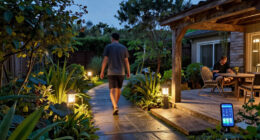
Think of it as a set of small stage cues for your home. The porch can brighten at dusk, the path can light for a few minutes when you arrive, and the patio can stay warm and dim during dinner. For example, if you return from walking the dog at 9 p.m., a motion sensor at the side gate could light the steps without keeping every garden fixture on all evening. This separation matters because the needs change by place and time: steady porch light helps you find keys, while a short path cue is enough to guide a late arrival. If one routine switches on the whole yard, you lose that flexibility and create more glare and run time than the task needs.
Common uses include entryways, paths, gardens, patios, garages, and security lighting. They do not all need the same treatment: a low path light helps you spot a step, while a garage fixture may need broader coverage. Homeowners can manage these zones separately when the equipment and app support it, setting each scene to match how that space is used. Before choosing products, walk the routes you actually use and note where visibility changes; this often reveals that two modest zones solve the problem better than one powerful fixture.
Automation gives you more control over timing, but it doesn’t make lighting a substitute for a lock, alarm, or safe installation. Motion-triggered lights can improve visibility near an entrance; they cannot promise that a crime will not happen. A sensible first project is often one porch light and one dim path or gate light, then adding zones once you know what your property needs. Starting small also lets you observe whether a sensor catches passersby or whether a fixture shines into a window before you repeat the setup elsewhere.
Products Worth Considering

Philips Hue Bridge Pro Starter Kit with 4 A19 E26 Color Smart Bulbs

Dyson V8 Cyclone Cordless Vacuum

Dyson Cyclone V10 Origin Cordless Vacuum
As an affiliate, we earn on qualifying purchases.
Match the light to the job, not just the fixture
Choose brightness and color by the task: lumens describe the amount of light, while color temperature affects whether it looks warm or cool. A warm white often suits a patio where you want a relaxed glow; a brighter or cooler light may be more useful over a work area. The right amount depends on fixture placement, surrounding surfaces, and how much area you need to see. More lumens do not automatically mean better visibility: a bright source in your line of sight can make nearby shadows seem darker and make it harder to see beyond the lit patch.
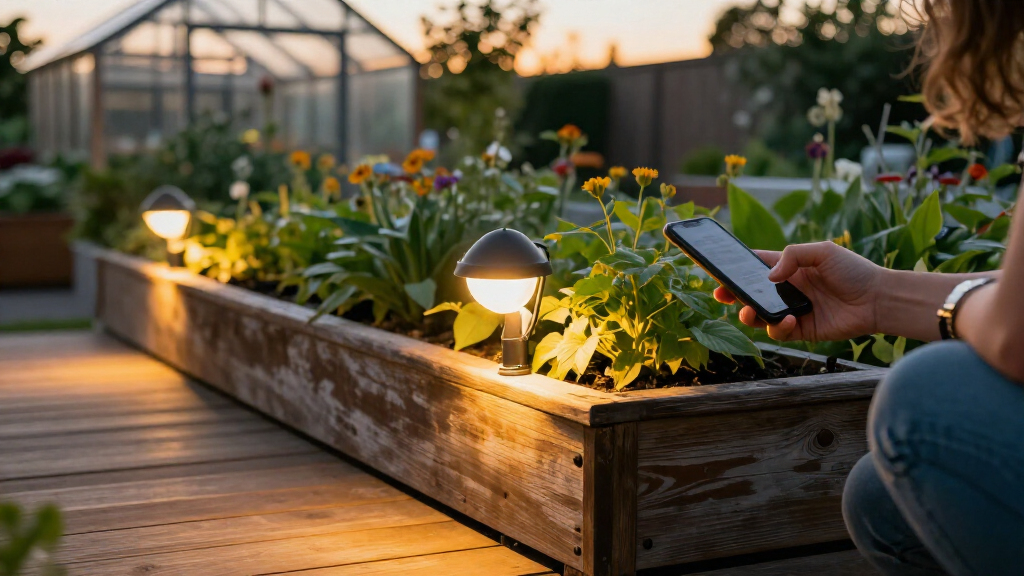
Picture a narrow stone path beside a flower bed. A few low, shielded lights can reveal the edge and the uneven paving, while one harsh beam pointed across the whole garden creates glare and washes out the flowers. Aim lights down or toward the specific surface they need to illuminate. That also helps reduce spill toward bedroom windows and the night sky. Spacing matters too: lights placed too close together can create bright pools, while large gaps leave abrupt dark sections. A test walk helps you judge the transition with your own eyes.
Compare the options in the product specifications rather than judging a fixture by its appearance alone. A compact fitting can make more light than you expect, and a fixture with a wide beam can spread light beyond its target. If you can, test one light at its installed height before buying enough for the whole border; wet paving, pale walls, and foliage all change how bright an area feels. A narrow beam may keep light contained but leave an uneven edge; a wider beam can cover more area with fewer fixtures but is more likely to spill onto neighboring spaces.
| Area | Useful starting point | What to watch |
|---|---|---|
| Porch or door | Light that clearly shows the handle and steps | Shadows and glare at eye level |
| Path | Low, spaced light that marks edges | Bright spots between dark gaps |
| Patio | Warm, adjustable light for sitting | Spill into neighbors’ windows |
| Work area or garage | Broader, brighter task lighting | Beam direction and safe wiring |
There is no single brightness number that suits every property. Start with the path or task you need to see, then adjust the position and output. A smaller pool of well-aimed light can feel clearer than a brighter fixture that shines into your eyes. Dimming is useful here because it lets you tune the balance after installation; a fixture that is adequate at full power can often be set lower for ordinary evenings.
Pick a connection that reaches the place you want to light
Outdoor lights connect through different protocols, including Wi-Fi, Bluetooth, Zigbee, Z-Wave, Thread, or a manufacturer’s own bridge. That choice affects setup, range, reliability, and whether the lights can work with the rest of your smart home. Some products connect to your router directly; others need a hub or bridge to coordinate devices. The practical tradeoff is between simplicity and system design: direct Wi-Fi can avoid another box, while a bridge-based setup may coordinate more devices and reduce the number of fixtures competing for router capacity. Bridges add cost and another device to maintain, so they are most useful when they solve a real range or compatibility problem.
Range can be the catch. A Wi-Fi bulb on the front porch may work perfectly when the router sits in a nearby room, yet lose connection at a detached garage behind brick walls. A bridge or mesh network may suit that layout better. Before you buy, check the manufacturer’s range guidance and think about the distance, walls, and outbuildings between the controller and the fixture. Outdoor range is hard to infer from an indoor test because dense walls, metal doors, and the location of the router can weaken a signal. If control drops intermittently, schedules and sensors may behave differently from app commands, depending on where those rules run.
Matter and Thread are part of a broader move toward cross-brand compatibility, but the label alone does not guarantee every feature will work with every app. Check the exact device, platform, and function you want: scheduling, color changes, motion response, and remote control may have different requirements. For instance, if you use Apple Home or Google Home, confirm support for your chosen light and sensor together, not just the bulb by itself. Compatibility is a chain: the light, sensor, controller, and app each need to support the function. A device may appear in an app yet lack a particular setting, so verify the routines you plan to use before buying several units.
Also check what happens during a connection failure. Some schedules may keep running locally through a hub, while other controls may depend on an internet service or app connection. If you want the porch to turn on every evening even when your router is being restarted, look for that behavior in the product documentation. Local control can make basic lighting more dependable, though remote access may still be unavailable until the connection returns. A little research here can prevent a smart light from becoming an ordinary light you cannot control.
Choose power and weather protection for the actual location
Outdoor equipment needs protection suited to its exposure, and its power source needs to suit the site. IP ratings describe protection from dust and water, but an IP rating by itself does not establish that a fixture is right for every location. Follow the maker’s placement, temperature, and installation instructions. A sheltered porch and an exposed post beside a sprinkler face different conditions. Ratings help narrow the options, but wind-driven rain, direct spray, heat, cold, and trapped moisture can affect a fixture in ways a single label does not capture.
There are four common power choices: hardwired fixtures, plug-in lights, low-voltage systems, and solar lights. Hardwired fittings can give you a tidy, dependable setup, but wiring work may require a qualified electrician and must follow local electrical codes. Plug-in models are easier to place near an outdoor outlet. Low-voltage systems can suit landscape runs, while solar lights avoid wiring but depend on sunlight, placement, battery capacity, and seasonal conditions. The tradeoff is convenience versus predictability: solar avoids trenching and outlet access, but output can fall when days are short or panels are shaded; wired systems take more planning but are less dependent on weather.
Consider a shaded path beneath mature trees. A solar stake might look bright in a summer product photo, then fade after several cloudy winter days because its panel receives little direct sun. In that spot, a wired or low-voltage option may be more reliable. On a sunny fence post far from an outlet, solar may be the practical choice. The yard itself should decide. Think about where the panel can sit, not only where the lamp should shine; a remote panel with a lead can help in some designs, but its cable route and length become part of the installation.
For a smart bulb in an existing fixture, check that the bulb is designed for the fixture’s enclosure and outdoor conditions. A covered fitting does not automatically make any indoor bulb suitable outside. Enclosed fixtures can trap heat, shortening bulb life or affecting electronics, while a fitting exposed to rain needs protection appropriate to that location. If you are unsure about water exposure, wiring, temperature limits, or code requirements, follow the manufacturer’s instructions and ask a qualified electrician. Keep the product label available so the installer can match the fixture to its intended location.
Build a schedule that feels natural and saves wasted light
Use routines and sensors to light only the space you need. Sunset and sunrise schedules can handle regular evening lighting, while motion controls can switch on a gate or path when someone approaches. Dimming, timers, and separate zones make it easier to get useful visibility without leaving every exterior light on until morning. The benefit depends on setup: a schedule that does not account for seasonal sunset shifts can switch on too early, and a sensor aimed at a street may create more light than a simple timer.
Start with a routine that mirrors an ordinary evening. The front porch might come on at sunset at a comfortable level, then dim later; the side path can stay off until motion triggers it for a short period. If you host friends on Saturday, a patio scene can brighten the seating area without changing the daily schedule for the garage. Check the app’s time and location settings so sunset routines follow your local day length. Separate zones let you keep a welcome light steady while reserving brighter output for the moment it is needed, which can reduce both energy use and the sense that the whole property is permanently lit.
- Map the routes people use after dark, such as the front steps, bin path, and side gate.
- Choose a separate zone for each distinct job so a motion event near the gate does not brighten the entire garden.
- Set a modest starting level and a short shutoff delay, then test it on a real walk through the yard.
- Adjust for false triggers from passing traffic, moving branches, or pets, if your sensor offers placement or sensitivity controls.
- Review the routine after a week and change timings that feel too bright, too slow, or inconvenient.
For example, a sensor aimed across a driveway may react to every passing car. Turning it toward the walkway and lowering its sensitivity, when supported, can help the light respond to a person approaching the door instead. Motion sensors vary in what they detect, so test them at the distance and angle where you expect them to work. A longer timeout feels forgiving when you are carrying bags but uses more power and leaves light on longer; a very short one saves run time but may switch off before you reach the door.
Use only the light needed. Bright lights left on for long stretches can disturb neighbors and wildlife, especially when they spill into trees or open sky. Timers and motion controls reduce that spill when you set them thoughtfully; they also make it easier to avoid paying for hours of unused lighting. If wildlife or nearby bedrooms are a concern, favor shielded fixtures, lower levels, and shorter operating periods rather than relying on automation alone.
Check security, privacy, and running costs before you buy
A smart light depends on more than its bulb: accounts, apps, internet access, power, and sometimes a cloud service shape how you control it. Review the permissions the app requests, protect the account with a unique password, and turn on extra account security when offered. If a product includes a camera or records activity, read how those features store and share data. This matters because an account can reveal routines or activity around the home; limit access to people who need it and check whether you can delete recordings or disable collection you do not use.
Imagine your porch light works through an app while you are away, but the home router has lost power. Remote control may stop until the connection returns. The device may still follow a locally stored schedule, or it may not; check the manufacturer’s guidance before relying on that routine. Also check whether a subscription is required for features you care about, and what remains available if you cancel it. A subscription can turn a low initial price into a recurring cost, while cloud-dependent features may stop working if service ends, so compare the ongoing fee with the function you will actually use.
LED lighting generally uses less energy than older incandescent lighting, but your bill depends on how many lights you install, their power draw, and how long they run. A motion-triggered path light that stays on briefly can use less energy than a bright fixture left on all night. Yet adding many fixtures or choosing high output can erase some of the savings. Look at the product’s wattage and think about the hours your routine will keep it lit. As a rough comparison, multiply watts by hours of use to understand relative consumption; even without an exact tariff calculation, this shows why runtime and output matter as much as the bulb type.
Lighting can help you see a doorway or notice movement, but it does not guarantee security. A useful setup pairs clear visibility with sensible locks and other home safety measures. For a practical test, turn off the internet briefly during a quiet afternoon and see what still works: the wall switch, saved schedule, sensor, and app may each behave differently. That test tells you more than a feature list. It also helps distinguish a minor inconvenience, such as losing remote dimming, from a reliability problem, such as a required path light no longer responding to motion.
Frequently Asked Questions
Do outdoor smart lights need Wi-Fi or a hub?
Some lights connect directly to Wi-Fi, while others use Bluetooth, Zigbee, Z-Wave, Thread, or a proprietary bridge. Check the specific product’s setup and range requirements, especially if the fixture is far from your router. A hub may help coordinate devices or extend coverage, depending on the system.
Will my outdoor lights work if the internet goes down?
It depends on where the device stores its schedules and what controls rely on an internet service. A locally stored routine or sensor may keep working, while remote app access can stop. Check the manufacturer’s offline guidance, and test the behavior before you rely on it for an evening routine.
Are outdoor smart lights waterproof?
Look for an IP rating and follow the manufacturer’s instructions for placement and temperature. The rating describes dust and water protection, but does not by itself prove that a fixture suits every exposed location. A covered porch and an open garden post may call for different equipment.
Can I put a smart bulb in my existing outdoor fixture?
Only if the bulb is rated for the fixture and its outdoor conditions. Check compatibility with any enclosed fitting, local temperature range, and the smart system you use. A covered fixture does not make an indoor-only bulb suitable for outdoor use.
Are solar outdoor smart lights a good choice?
They can be useful where wiring is difficult and the panel gets enough sun. Their performance depends on sunlight, placement, battery capacity, and season, so a shaded path may not stay bright through cloudy winter weather. Check the expected runtime and position the panel where it receives useful light.
Conclusion
Start with the route you walk after dark, then light that route with the least brightness that makes it clear. Choose fixtures suited to their exposure, confirm how they connect, and set a schedule you can live with after the novelty wears off.
A well-planned yard has a warm welcome at the door and quiet darkness beyond it. Let the light guide your next step, then give the night back to the stars.