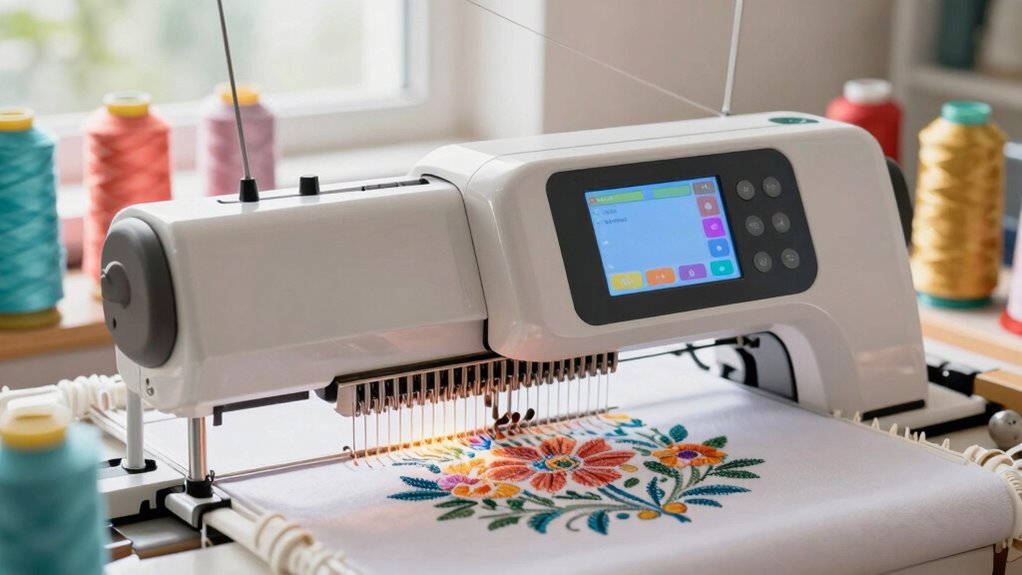
Finding the perfect embroidery machine for home use involves balancing features, ease of use, and budget. The Brother SE700 stands out as the best overall choice, offering a versatile combo of sewing and embroidery functions. For those new to embroidery, the Poolin EOC05 provides a beginner-friendly experience with a manageable embroidery area. Meanwhile, the Poolin EOC06 Bundle appeals to hobbyists looking for a large design area and extensive color options. Each option involves tradeoffs, such as size, complexity, or price. Continue reading for a detailed breakdown of these and other top picks, helping you find the right fit for your home projects.

Get garden gear delivered free with Prime
- Fast, free delivery on millions of items
- Prime Video, Amazon Music and more included
- Member-only deals all year
Complete the kit


Key Takeaways
- The top-ranked models combine ease of use with versatile features, making them suitable for different skill levels.
- Embroidery area size varies significantly — larger hoops are ideal for detailed projects but often come with increased cost and bulk.
- Wireless connectivity and touchscreen controls are common among premium options, improving usability but adding to the price.
- Bundles that include multiple hoops, threads, and accessories tend to offer better value for dedicated hobbyists.
- Choosing a machine with built-in designs can save time, but expandability and custom design support remain important for advanced users.
| Brother SE700 Sewing and Embroidery Machine Bundle |  | Best Overall for Versatility and Advanced Features | Embroidery Designs: 135 built-in | Sewing Stitches: 103 built-in | Embroidery Fonts: 10 built-in | VIEW ON AMAZON | See Our Full Breakdown |
| Poolin EOC05 Embroidery Machine for Beginners, 4 x 9.25 inch Embroidery Area |  | Best for Beginners Focused on Embroidery | Embroidery Area: 4 x 9.25 inches | Touchscreen: 7-inch color touchscreen | Connectivity: WiFi and USB | VIEW ON AMAZON | See Our Full Breakdown |
| Poolin EOC06 Embroidery Machine Bundle, 7.9″ x 11″, 80 Colors + 144 Bobbins |  | Best for Large Projects and Extensive Supplies | Embroidery Area: 7.9″ x 11″ | Colors Included: 80 | Bobbin Count: 144 | VIEW ON AMAZON | See Our Full Breakdown |
| Brother PE545 Wireless Embroidery Machine with 4×4 Hoop and LCD |  | Best for Compact, Wireless Embroidery | Embroidery Field: 4″ x 4″ | Touchscreen: 3.7-inch LCD color | Built-in Designs: 135 | VIEW ON AMAZON | See Our Full Breakdown |
| Brother SE700 Combo Embroidery & Sewing Machine with 4 Embroidery Hoops, Embroidery Thread Set & Accessories |  | Best for All-in-One Versatility with Extensive Accessories | Embroidery Designs: 135 built-in | Sewing Stitches: 103 built-in | Embroidery Hoops: 4 | VIEW ON AMAZON | See Our Full Breakdown |
| Brother Skitch Single-Needle Embroidery Machine Bluetooth |  | Best for Beginners and Casual Crafters | Embroidery Area: 4″ x 4″ | Maximum Speed: 400 spm | Connectivity: Bluetooth | VIEW ON AMAZON | See Our Full Breakdown |
| Poolin EOC07 Embroidery Machine with 7″ Touchscreen and 200 Built-in Designs |  | Best for Intermediate Home Businesses | Embroidery Area: 11×7.9 inches | Hoops Included: 2 × 5.5″×5.5″, 1 × 7.9″×7.9″, 1 × 7.9″×11″ | Touchscreen: 7-inch color display | VIEW ON AMAZON | See Our Full Breakdown |
| Brother SE700 Sewing and Embroidery Machine with Wireless LAN |  | Best for Versatile Crafters Seeking Flexibility | Embroidery Field: 4″ x 4″ | Touchscreen: 3.7-inch LCD color touchscreen | Built-in Designs: 135 | VIEW ON AMAZON | See Our Full Breakdown |
| Poolin EOC06 Large Hoop Embroidery Machine, 11 x 7.9 in Embroidery Area |  | Best for Large-Scale Projects and Enthusiasts | Max Embroidery Area: 11 x 7.9 inches | Hoops Included: 2 x 5.5″ x 5.5″, 1 x 7.9″ x 7.9″, 1 x 7.9″ x 11″ | Display: 7-inch LCD touch screen | VIEW ON AMAZON | See Our Full Breakdown |
| PooLin EOC03 Embroidery Machine with 4×4 & 4×9.25 Inch Embroidery Areas, WiFi Transfer, 130 Built-in Designs, Beginner Friendly |  | Best for Entry-Level Users Wanting Versatility | Embroidery Area: 4″ x 4″ and 4″ x 9.25″ | Built-in Designs: 130 | WiFi Transfer: Yes | VIEW ON AMAZON | See Our Full Breakdown |
| embroidery machine for home | Connectivity | Embroidery Area |
|---|---|---|
| Brother SE700 Sewing and Embro | — | — |
| Poolin EOC05 Embroidery Machin | WiFi and USB | 4 x 9.25 inches |
| Poolin EOC06 Embroidery Machin | Wi-Fi, USB | 7.9" x 11" |
| Brother PE545 Wireless Embroid | Wireless LAN, USB | — |
| Brother SE700 Combo Embroidery | — | — |
| Brother Skitch Single-Needle E | Bluetooth | 4" x 4" |
| Poolin EOC07 Embroidery Machin | Wi-Fi, USB | 11×7.9 inches |
| Brother SE700 Sewing and Embro | Wireless LAN, USB | — |
| Poolin EOC06 Large Hoop Embroi | — | — |
| PooLin EOC03 Embroidery Machin | — | 4" x 4" and 4" x 9.25" |
More Details on Our Top Picks
Brother SE700 Sewing and Embroidery Machine Bundle
The Brother SE700 stands out for its combination of sewing and embroidery functions, offering a wide variety of 135 built-in embroidery designs and 103 sewing stitches, all accessible via a 3.2 x 1.8-inch color LCD touchscreen. Compared with the Poolin EOC06, which has a larger embroidery area and more thread options, the SE700 provides more user-friendly controls and wireless connectivity, making it ideal for serious hobbyists who want a seamless experience. Its automatic needle threading and wireless design transfer set it apart, but the higher price and larger footprint mean it might not suit space-constrained or budget-conscious users. Overall, this machine makes the most sense for dedicated crafters seeking versatility, convenience, and advanced editing tools.
Pros:- Wide variety of built-in embroidery designs and stitches
- User-friendly LCD touchscreen interface
- Wireless design transfer capability
- Automatic needle threading for ease of use
Cons:- Relatively high price point compared to simpler models
- Large size requiring ample workspace
- Limited to embroidery and sewing functions, no quilting features
Best for: Experienced hobbyists or small business owners who want a versatile, feature-rich machine with wireless connectivity.
Not ideal for: Beginners on a tight budget or those with limited workspace who might find the size and price prohibitive.
- Embroidery Designs:135 built-in
- Sewing Stitches:103 built-in
- Embroidery Fonts:10 built-in
- Buttonhole Styles:10 styles of auto-size buttonholes
- LCD Screen:3.2 x 1.8 inch color touchscreen
- Wireless Connectivity:Yes
Our verdict“Ideal for experienced users seeking a versatile machine with advanced features and wireless connectivity.”
Poolin EOC05 Embroidery Machine for Beginners, 4 x 9.25 inch Embroidery Area
The Poolin EOC05 is designed specifically for those new to embroidery, featuring an easy-to-use 7-inch color touchscreen and a generous 4 x 9.25-inch embroidery area. Compared with the Poolin EOC06, which has a larger workspace and more colors, the EOC05 offers a simplified interface perfect for beginners who want straightforward operation without extra sewing functions. Its WiFi and USB connectivity facilitate easy design transfers, but it lacks sewing capabilities and has a learning curve despite its beginner label. This model makes the most sense for hobbyists starting with embroidery and prioritizing ease of use over size or extensive features.
Pros:- Intuitive controls and large touchscreen for easy operation
- Generous embroidery area for larger designs
- WiFi and USB connectivity for design transfer
- Includes free embroidery design software
Cons:- Limited to embroidery only, no sewing capabilities
- Not suitable for commercial or high-volume projects
- Requires some learning curve despite beginner focus
Best for: Beginners or hobbyists who want a dedicated embroidery machine with a large screen and simple controls.
Not ideal for: Experienced sewists or those wanting a combined sewing and embroidery machine, as it lacks sewing functions.
- Embroidery Area:4 x 9.25 inches
- Touchscreen:7-inch color touchscreen
- Connectivity:WiFi and USB
- Design Software:Free embroidery software
Our verdict“Perfect for embroidery newcomers seeking a user-friendly, dedicated machine with large design space.”
Poolin EOC06 Embroidery Machine Bundle, 7.9″ x 11″, 80 Colors + 144 Bobbins
The Poolin EOC06 offers a sizable 7.9 x 11-inch embroidery area, making it ideal for larger projects like tote bags, apparel, or home décor. Compared to the Brother SE700, which emphasizes versatility and editing, the EOC06 prioritizes space and supply volume, including 80 thread colors and 144 bobbins—great for serious hobbyists or small shops. Its large touchscreen simplifies design adjustments, but the machine’s size and complexity can be intimidating for beginners. This pick makes the most sense for users who regularly work on bigger projects and need a machine with extensive thread options and a large workspace.
Pros:- Large embroidery area suitable for big projects
- Extensive thread and bobbin supply included
- User-friendly touchscreen for design editing
- Automatic threading and thread trimming features
Cons:- Can be complex for complete beginners
- Requires ample space for setup
- Higher price point for the size and features
Best for: Experienced hobbyists or small businesses needing a large embroidery area and abundant supplies.
Not ideal for: Beginners or users with limited space who prefer a compact, simpler machine.
- Embroidery Area:7.9″ x 11″
- Colors Included:80
- Bobbin Count:144
- Connectivity:Wi-Fi, USB
Our verdict“Best suited for experienced users who want to tackle large embroidery projects with plenty of color options.”
Brother PE545 Wireless Embroidery Machine with 4×4 Hoop and LCD
The Brother PE545 is a compact, wireless embroidery machine with a 4 x 4-inch embroidery field, making it an excellent choice for small, detailed projects. Its 3.7-inch color touchscreen simplifies design editing, and the 135 built-in designs provide a variety of options. Compared with the Brother SE700, which combines sewing and embroidery, the PE545 focuses solely on embroidery, offering a more streamlined experience for dedicated embroidery work. Its wireless transfer capabilities via PC or mobile app make design management convenient, but its limited hoop size constrains larger projects. This model suits users who want a portable, easy-to-use embroidery machine with wireless features for home use or small projects.
Pros:- Wireless transfer of embroidery files via PC and mobile app
- Large 3.7-inch color touchscreen for editing
- 135 built-in designs and 10 fonts
- Compact size for easy storage
Cons:- Limited to small 4×4 inch embroidery field
- Designed only for embroidery, no sewing functions
- Limited to US voltage (120V), may need transformer elsewhere
Best for: Home users who prioritize portability and wireless design transfer for small embroidery projects.
Not ideal for: Users seeking larger embroidery areas or combined sewing and embroidery functions.
- Embroidery Field:4″ x 4″
- Touchscreen:3.7-inch LCD color
- Built-in Designs:135
- Connectivity:Wireless LAN, USB
Our verdict“Ideal for users who want a portable, wireless embroidery machine perfect for small projects at home.”
Brother SE700 Combo Embroidery & Sewing Machine with 4 Embroidery Hoops, Embroidery Thread Set & Accessories
The Brother SE700 Combo blends sewing and embroidery functions in a single machine, equipped with 135 built-in embroidery designs, 103 sewing stitches, and four different hoops to accommodate various project sizes. Compared to the PE545, which is more compact and dedicated to embroidery, the SE700 offers a broader range of sewing options and accessories, making it suitable for users who want an all-in-one machine for diverse projects. Its extensive bundle—including embroidery threads, hoops, and multiple feet—adds value but also increases the overall complexity and cost. This model makes the most sense for home sewists who want flexibility and a large selection of accessories for both sewing and embroidery tasks.
Pros:- Versatile combo machine for sewing and embroidery
- Multiple hoops for different project sizes
- Includes extensive accessory and thread bundles
- 135 built-in embroidery designs
Cons:- Heavier and bulkier than dedicated embroidery-only models
- More complex setup and operation for beginners
- Higher price point due to bundle and features
Best for: Home sewists seeking a comprehensive machine for both sewing and embroidery with a large accessory bundle.
Not ideal for: Pure embroidery enthusiasts or users with minimal space who prefer a dedicated embroidery-only machine.
- Embroidery Designs:135 built-in
- Sewing Stitches:103 built-in
- Embroidery Hoops:4
- Accessories Included:Multiple hoops, threads, feet
Our verdict“Best for hobbyists who want an all-in-one machine with extensive accessories and project versatility.”
Brother Skitch Single-Needle Embroidery Machine Bluetooth
The Brother Skitch stands out for its simplicity and wireless connectivity, making it ideal for newcomers to embroidery. Unlike the more advanced Poolin EOC07, which offers a larger workspace and more designs, the Skitch keeps things straightforward with a 4×4 inch area and just 20 design slots. This makes it perfect for small projects and quick customization, but it doesn’t support sewing functions or extensive design storage, limiting its versatility. Its Bluetooth connection with the Artspira app facilitates easy import of designs, though reliance on the app can be a drawback for those who prefer standalone machines. This option makes the most sense for hobbyists who want an easy-to-use device without extra features they won’t utilize.
Pros:- User-friendly interface tailored for beginners
- Wireless Bluetooth connectivity via Artspira app
- Compact size fits small craft spaces
Cons:- Limited to embroidery only, no sewing functions
- Small design storage capacity of 20 designs
- Requires the Artspira app for full functionality
Best for: Beginners or hobbyists seeking a compact, easy-to-use embroidery machine for simple projects.
Not ideal for: Experienced quilters or small business owners needing larger embroidery areas and extensive design libraries.
- Embroidery Area:4″ x 4″
- Maximum Speed:400 spm
- Connectivity:Bluetooth
- Design Storage:Up to 20 designs
- Power Supply:120V US only
Our verdict“This pick is best for newcomers who want a simple, wireless embroidery machine for modest projects.”
Poolin EOC07 Embroidery Machine with 7″ Touchscreen and 200 Built-in Designs
The Poolin EOC07 offers a significant upgrade over smaller machines like the Brother Skitch, with an impressive 11×7.9 inch embroidery area and a 7-inch color touchscreen that simplifies operation. It includes 200 built-in designs and multiple hoops, enabling larger, more complex projects suitable for small-scale commercial work or detailed DIY crafts. While its extensive features make it a powerful tool, this machine can overwhelm complete beginners who lack prior experience with embroidery software or multi-hoop setups. Unlike the more straightforward Brother SE700, which is better suited for casual use, the EOC07 balances advanced features with user-friendliness for those willing to learn. This makes it ideal for serious hobbyists and small business owners ready to expand their capabilities.
Pros:- Large embroidery area supports complex and high-value projects
- Wireless Wi-Fi transfer adds convenience
- Intuitive 7-inch color touchscreen
Cons:- May be challenging for complete beginners without prior experience
- Limited to 200 preloaded designs, requiring external design uploads
- Requires some learning curve for optimal use
Best for: Home entrepreneurs and DIY enthusiasts ready to tackle larger embroidery projects with a versatile machine.
Not ideal for: Absolute beginners or those with limited space, as the machine’s complexity and size demand some familiarity and room.
- Embroidery Area:11×7.9 inches
- Hoops Included:2 × 5.5″×5.5″, 1 × 7.9″×7.9″, 1 × 7.9″×11″
- Touchscreen:7-inch color display
- Built-in Designs:200
- Connectivity:Wi-Fi, USB
- Warranty:1 year
Our verdict“This model is best for hobbyists and small business owners who want a large workspace and advanced features but are comfortable with a moderate learning curve.”
Brother SE700 Sewing and Embroidery Machine with Wireless LAN
The Brother SE700 combines sewing and embroidery functions in one machine, offering a 4×4 inch embroidery area and a 3.7-inch color touchscreen for seamless design editing. Its 135 built-in designs and 103 sewing stitches provide a broad creative palette, making it suitable for users who want both sewing and embroidery capabilities without switching machines. Compared to dedicated embroidery-only models like the Poolin EOC06, the SE700 offers more versatility but with a smaller embroidery field, which may limit larger projects. Its wireless connectivity simplifies design transfer, yet the limited embroidery space makes it less ideal for large or complex embroidery tasks. This machine makes the most sense for users who want a hybrid device that handles multiple types of projects in a compact form.
Pros:- Wireless connectivity for easy design transfer
- Large color touchscreen for on-screen editing
- Includes a variety of built-in designs and stitches
Cons:- Limited to 4×4 inch embroidery area
- Requires 120V power, only for US use
- Small embroidery field for larger designs
Best for: Crafters who want an all-in-one sewing and embroidery machine for varied projects around the home.
Not ideal for: Those seeking a dedicated embroidery machine with large embroidery areas or heavy-duty sewing features.
- Embroidery Field:4″ x 4″
- Touchscreen:3.7-inch LCD color touchscreen
- Built-in Designs:135
- Built-in Sewing Stitches:103
- Auto Needle Threader:Yes
- Connectivity:Wireless LAN, USB
Our verdict“This model is best for versatile users who want a combined sewing and embroidery machine with moderate embroidery space for home projects.”
Poolin EOC06 Large Hoop Embroidery Machine, 11 x 7.9 in Embroidery Area
The Poolin EOC06 offers one of the largest embroidery areas in this lineup, with 11×7.9 inches supported by multiple hoops and a 7-inch LCD touch screen. It excels at handling large, detailed designs, making it suitable for serious hobbyists or small-scale commercial use. While its extensive features and large workspace surpass models like the Brother Skitch or SE700, this machine can be overwhelming for absolute beginners due to its complexity and the need for additional supplies. Its support for design transfer via USB and wireless LAN adds flexibility, but the software and hardware may require some learning. This machine is best for dedicated embroidery enthusiasts who prioritize size and capacity over simplicity.
Pros:- Massive embroidery area supports large projects
- User-friendly touchscreen interface
- Supports design transfer via USB and wireless LAN
Cons:- May need additional needles for thicker fabrics
- Complex features may challenge complete beginners
- Limited info on software compatibility
Best for: Embroidery enthusiasts or small business owners needing large-format embroidery capabilities.
Not ideal for: Complete beginners or those with limited space, as the machine’s size and feature set demand familiarity and room.
- Max Embroidery Area:11 x 7.9 inches
- Hoops Included:2 x 5.5″ x 5.5″, 1 x 7.9″ x 7.9″, 1 x 7.9″ x 11″
- Display:7-inch LCD touch screen
- Built-in Patterns:200
- Fonts:8
- Included Supplies:6 rolls of polyester thread, multicolor pre-wound bobbins, stabilizers
Our verdict“This machine is ideal for dedicated embroidery hobbyists or small businesses prioritizing large projects and advanced features.”
PooLin EOC03 Embroidery Machine with 4×4 & 4×9.25 Inch Embroidery Areas, WiFi Transfer, 130 Built-in Designs, Beginner Friendly
The PooLin EOC03 combines affordability and ease of use with its dual embroidery size options, 4×4 and 4×9.25 inches, making it a flexible choice for beginners. Its 130 built-in designs and WiFi transfer capability simplify sharing and customizing projects, similar to the Poolin EOC06 but with less complexity. While it’s friendly to newcomers, it offers limited advanced features, making it less suitable for those seeking professional-level capabilities. The inclusion of a starter kit and tutorials makes learning straightforward, but reliance on internet connection for WiFi transfer can be restrictive for some. This machine fits best for hobbyists just starting out or those who prefer straightforward, versatile embroidery options at home.
Pros:- Easy-to-use interface suitable for beginners
- Two embroidery sizes for project versatility
- WiFi transfer simplifies design sharing
Cons:- Limited to basic embroidery features
- Requires internet connection for WiFi transfer
- Learning curve for complete beginners unfamiliar with digital sharing
Best for: Beginners or hobbyists seeking an affordable, user-friendly embroidery machine with multiple sizes and WiFi sharing.
Not ideal for: Advanced users or small business owners needing extensive design options and high-capacity features.
- Embroidery Area:4″ x 4″ and 4″ x 9.25″
- Built-in Designs:130
- WiFi Transfer:Yes
- Fonts:8
- Included:Starter kit
Our verdict“This model is best for beginners wanting a versatile, easy-to-operate embroidery machine with wireless sharing options.”

How We Picked
These embroidery machines were selected based on a combination of performance, ease of use, build quality, and value. We prioritized models that balance beginner friendliness with advanced features, ensuring they are suitable for a variety of home users. Each product was evaluated on its embroidery area, connectivity options, included accessories, and overall versatility. The rankings reflect how well each machine performs relative to its price and intended user level, highlighting which options offer the best combination of features and usability for home embroiderers.| embroidery machine for home | Connectivity |
|---|---|
| Brother SE700 Sewing and Embro | — |
| Poolin EOC05 Embroidery Machin | WiFi and USB |
| Poolin EOC06 Embroidery Machin | Wi-Fi, USB |
| Brother PE545 Wireless Embroid | Wireless LAN, USB |
| Brother SE700 Combo Embroidery | — |
| Brother Skitch Single-Needle E | Bluetooth |
| Poolin EOC07 Embroidery Machin | Wi-Fi, USB |
| Brother SE700 Sewing and Embro | Wireless LAN, USB |
| Poolin EOC06 Large Hoop Embroi | — |
| PooLin EOC03 Embroidery Machin | — |
Factors to Consider When Choosing Embroidery Machine For Home
Choosing the right embroidery machine for home use involves several important considerations. First, think about the size of the embroidery area — larger hoops allow for bigger designs but often come at a higher cost and increased size. Connectivity features like WiFi or Bluetooth can streamline design transfer, especially if you plan to use custom or online designs. Ease of use, including touchscreen controls and intuitive interfaces, is key for beginners but may be less critical for experienced hobbyists. Additionally, consider the variety and number of built-in designs, as well as the machine’s expandability for future projects. Budgeting for accessories and maintenance also helps prevent unexpected expenses and ensures long-term satisfaction.Embroidery Area and Size
The size of the embroidery area directly impacts what projects you can undertake. Smaller hoops, such as 4×4 inches, are suitable for monograms and small accents, making them ideal for beginners or occasional use. Larger hoops, like 7.9×11 inches, enable bigger, more detailed designs but require more space and often come with a higher price tag. Think about your typical projects and available workspace when selecting this feature. Investing in a machine with a larger embroidery area can be worthwhile if you plan to expand your projects, but for casual hobbyists, a smaller, more manageable size might suffice.Connectivity and Software Compatibility
Wireless capabilities, such as WiFi or Bluetooth, simplify design transfer from your computer or mobile device, saving time and reducing cable clutter. Many modern machines also support direct upload of designs or work with dedicated apps, enhancing flexibility. However, these features often come at a premium, so weigh whether they are necessary for your level of activity. Compatibility with design software can expand your creative options but may require additional investment or learning curves. For beginners, basic USB transfer might be sufficient, but more advanced users should prioritize machines with seamless wireless connectivity.Ease of Use and User Interface
A user-friendly interface, often featuring a color touchscreen, can significantly reduce the learning curve. Machines with intuitive menus, preset stitches, and automated functions help users focus on creativity rather than technical fiddling. For those new to embroidery, straightforward setup and guided tutorials are valuable. Conversely, more complex interfaces may offer greater customization but can overwhelm beginners. Consider your comfort with technology and whether you’ll benefit from guided features or prefer a more customizable experience for advanced projects.Design Library and Expandability
Built-in design libraries are convenient, especially for quick projects, but check how extensive and varied they are. Some machines support external design files, allowing you to expand your collection via SD cards or direct downloads. If you plan to create custom designs or use online design services, ensure the machine supports these features. Upgradability, such as firmware updates or additional hoops, can extend your machine’s lifespan and versatility. For serious hobbyists or small business owners, investing in a machine with broad expandability offers long-term value.Budget and Accessories
Price points for embroidery machines vary widely, often reflecting feature sets and build quality. While budget models may suffice for basic projects, they might lack features like large embroidery areas or advanced connectivity. Consider whether the included accessories—extra hoops, threads, or software—align with your needs. Buying a bundle can often save money and provide a more complete setup. Be cautious of hidden costs such as additional hoops or specialty threads, and choose a machine that offers good value without sacrificing essential features.Frequently Asked Questions
Can I use my own designs with these embroidery machines?
Yes, most modern embroidery machines support importing custom designs via USB, SD card, or wireless transfer. Compatibility depends on the machine’s software and file formats, so it’s important to verify supported formats like PES, DST, or EXP. Some machines also offer built-in design editing tools, allowing you to modify or create new patterns directly on the device. For advanced customization, ensure the machine’s software or connected apps provide sufficient editing capabilities. This flexibility can greatly enhance your creative potential and tailor projects to your specific needs.Are these machines suitable for complete beginners?
Many of the models in this roundup, such as the Poolin EOC05 and EOC03, are designed with beginners in mind, featuring simple interfaces and guided setup. Machines with larger screens, automated functions, and pre-programmed designs help new users get started with minimal frustration. However, even more advanced machines can be suitable if they include comprehensive tutorials and user support. It’s important to match the machine’s complexity to your comfort level; starting with a straightforward model can build confidence before progressing to more advanced features.How much maintenance do these embroidery machines require?
Routine maintenance for embroidery machines typically involves cleaning lint and dust from the bobbin area, replacing needles regularly, and lubricating moving parts if specified by the manufacturer. Modern machines often feature self-cleaning functions or easy-access panels, simplifying upkeep. Proper maintenance ensures consistent stitching quality and prolongs the machine’s lifespan. Budget for occasional repairs or replacement parts, especially if you plan heavy usage. Following the manufacturer’s maintenance schedule is key to avoiding costly repairs and keeping your machine running smoothly.What should I consider if I want to upgrade to a larger embroidery area later?
When choosing a machine with an eye toward future expansion, look for models that support larger hoops or have modular attachments. Some machines allow you to upgrade the embroidery frame or add accessories, but others are limited by their physical design. Check the compatibility of external hoops and whether the machine’s software can handle larger designs. Keep in mind that larger embroidery areas often mean increased size and weight, so consider your workspace and portability needs. Planning ahead can help you avoid costly replacements or complicated upgrades down the line.Is it worth investing in a bundle with accessories?
Purchasing a bundle that includes additional hoops, threads, and design software generally offers better value, especially for beginners or hobbyists. Bundles often reduce the overall cost compared to buying accessories separately and provide everything needed to start right away. However, verify that the included accessories meet your specific project needs; sometimes, bundles contain items you may not use. Consider your planned projects, available workspace, and budget to determine if a bundle makes sense for you. Well-chosen accessories can enhance your experience and expand your creative options.Conclusion
For those just starting, the Poolin EOC05 offers an easy, affordable entry into home embroidery. Serious hobbyists or small business owners should consider the Brother PE545 or Poolin EOC06 Bundle for larger design areas and advanced features. If budget isn’t a concern and you desire a versatile machine, the Brother SE700 provides excellent value as an all-in-one sewing and embroidery combo. Beginners aiming for simplicity and expandability should choose models with guided interfaces, while experienced users might prioritize connectivity and design expandability. Matching your specific needs with these criteria ensures a satisfying embroidery experience at home.
Halloween Picks
halloween
As an affiliate, we earn on qualifying purchases.